In early 2021 Google deprecated the Chrome Web Store payments system, leaving many extension developers scrambling for alternatives. Starting March 2020 new paid extensions were blocked, by Sept 2020 all new in-app purchases were disabled, and as of Feb 1, 2021 even existing paid extensions could no longer charge customers. In practice, free trials disappeared and subscriptions stopped auto-renewing, and the licensing API itself is slated to shut down. Developers now have to migrate to external payment platforms and implement their own license tracking. (Notably, Google provides no bulk export of past license data, so devs must ask existing users to log in and switch to a new system.) These changes mean popular extensions — from productivity tools to VPNs — can no longer rely on the Chrome Store for payments and must find new ways to collect revenue.
Introducing Addon Pay
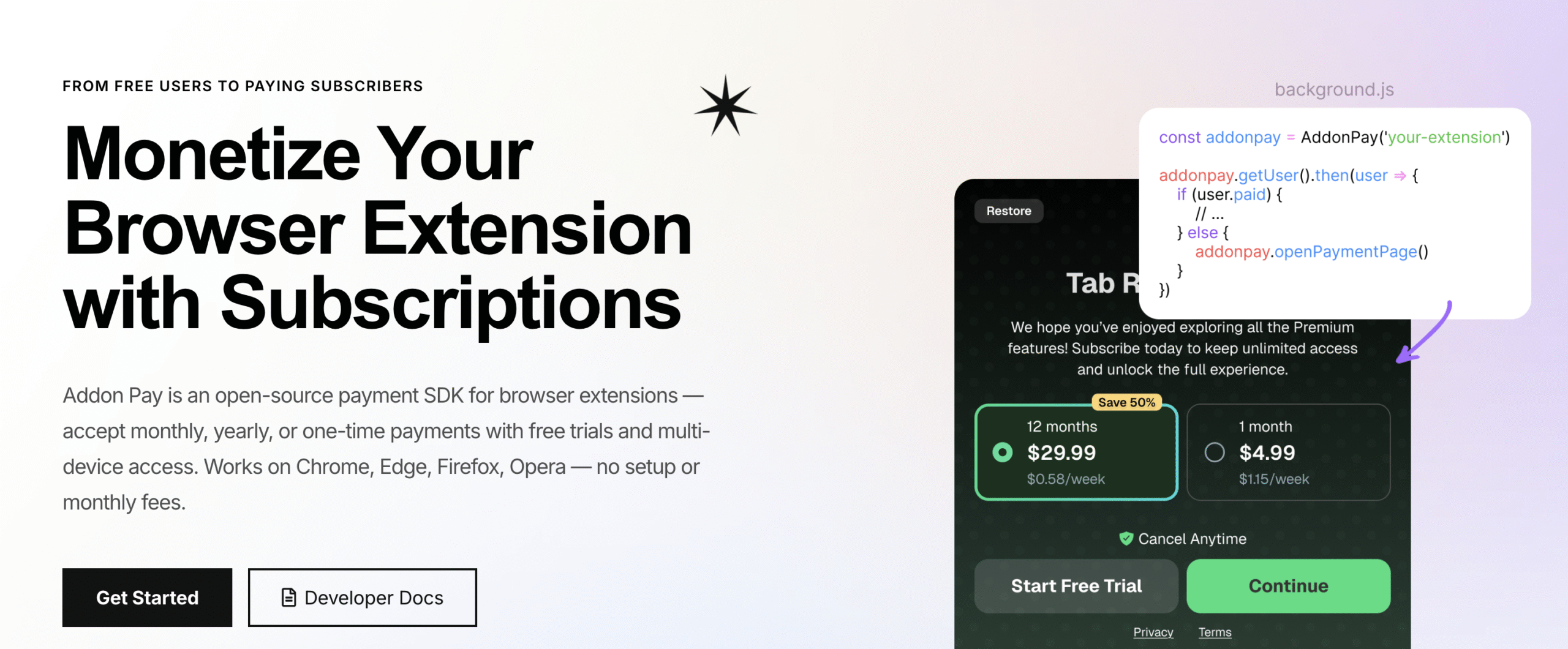
Addon Pay is a drop-in payment solution designed specifically for browser extensions. It provides an open-source SDK that lets you accept one-time purchases, subscriptions, and free trials across browsers (Chrome, Edge, Firefox, Opera, Brave, etc.) without building any backend services. With Addon Pay you simply link your Stripe account and embed their JavaScript library in your extension. The typical workflow is straightforward:
- Sign Up & Connect Stripe: Create a free Addon Pay account and link your Stripe merchant account.
- Install the SDK: Add the AddonPay.js script to your extension. The SDK takes care of user authentication, licensing, and billing by communicating with Addon Pay’s servers.
- Trigger Payments: In your extension’s code, call Addon Pay’s API to open a checkout flow when a user upgrades. After a successful payment, Addon Pay unlocks the premium features and deposits funds directly into your Stripe account.
This process is illustrated below. You never need to write server-side payment code or store credit-card data.
With Addon Pay you handle payments entirely from the client side. The open-source SDK “handles authentication, licensing, billing, and email flows out of the box” so you can “focus on building your extension”. In other words, drop in Addon Pay’s library and let it do the heavy lifting.
Key Features of Addon Pay
- One SDK, No Backend Needed: Addon Pay’s client-side SDK manages everything. It integrates into your extension and calls Addon Pay’s servers as needed, so you avoid building any payment backend or database. This can save weeks of work — instead of wrestling with Stripe APIs and servers, you focus on features.
- Secure Global Payments: Under the hood Addon Pay uses Stripe for checkout. Users pay via Stripe’s hosted form (cards, Apple Pay, Google Pay, etc.) from anywhere in the world. (Card data never touches your code.) This lets you “accept payments worldwide through Stripe” without handling PCI compliance yourself.
- Flexible Plans: You can offer monthly, quarterly, yearly, or one-time purchases, as well as free trials, all configurable from the Addon Pay dashboard. Addon Pay automatically handles recurring billing and renewals.
- Cross-Browser & Multi-Device: Addon Pay works on all major browsers, so you “launch once, earn everywhere”. It also supports multi-device logins: if a user installs your extension on another browser or computer, they can simply re-enter their purchase email to restore access. No separate license key distribution is needed.
- Global Currency Support: Your Stripe account can charge in 137+ currencies, and Addon Pay automatically handles currency conversion for you. You get paid in your home currency, while users pay in theirs.
- No Vendor Lock-In: All transaction data stays in your own Stripe account. There are no ongoing contracts or platform-hosted accounts. If you ever decide to move to another billing solution, your payment data remains with Stripe.
- Developer-Friendly Tools: Addon Pay is open source, well-documented, and includes features like test modes and reset hooks for development. It even provides a developer reset link to clear a test user’s paid status. In short, you can “add secure payments, subscriptions, and premium features in minutes — no backend, no setup fees, no complexity”.
In practice, Addon Pay simply brings up a Stripe-based checkout dialog (as shown above) when users want to upgrade. After they pay, Addon Pay automatically unlocks the premium extension features. Because Addon Pay is built on Stripe, user payments are processed securely and funds flow directly to your account.
Benefits
- Easy Integration: With Addon Pay you avoid building any payment or licensing code from scratch. Installation means dropping in a JavaScript file and calling a few API methods. By contrast, rolling your own Stripe integration or license server can take many days or weeks.
- All-in-One Licensing: Addon Pay not only processes payments but also verifies which users have paid. After purchase, the SDK can check a user’s paid status before enabling premium features. This unified approach replaces separate license servers or key management.
- Flexible Billing: The platform supports anything from simple one-time upgrades to complex subscription plans with trial periods. You get a live dashboard for subscription management and analytics without extra code.
- Lower Fees (for Extension Sales): Addon Pay’s platform fee is just 5% per sale (with no monthly charge). This is generally lower than Gumroad’s 10% or Paddle’s 5% plus fixed fees (and Gumroad only offers volume discounts via an expensive Pro plan). Combining Addon Pay’s 5% with Stripe’s ~2.9% processing fee means an effective ~8% platform cost. In return, you handle your own taxes and customer support.
- Direct Payouts: Unlike Gumroad or Paddle, Addon Pay is not merchant of record for your sales. All revenue flows into your Stripe account, and you get paid on Stripe’s normal schedule (usually daily or weekly) rather than waiting for a monthly aggregate payout.
Limitations and Trade-offs
No solution is perfect. Addon Pay has some trade-offs developers should know:
- Client-Side Limitations: The Addon Pay SDK runs in the user’s browser, so a determined attacker could try to tamper with it. Addon Pay acknowledges that “it’s impossible to make a completely secure client-side payment verification system”. In practice, the system is designed to be secure enough for honest users, but you should assume savvy users could hack your extension. (This is true of any browser-based licensing approach.)
- Stripe Dependency: You must have a Stripe account in a supported country. Addon Pay itself has no monthly fees, but you still pay Stripe’s standard processing fees (~2.9%+30¢) on each transaction. If Stripe is unavailable or limited in your region, Addon Pay won’t work.
- Tax Responsibility: Unlike Paddle or Gumroad, Addon Pay does not act as merchant of record. You will be responsible for collecting and remitting any sales tax, VAT, or GST in each jurisdiction. (Stripe does offer tax tools, but it’s up to you to configure them.)
- User Experience on Reinstall: If a paid user uninstalls and reinstalls the extension, Addon Pay can restore their access only if you implement it. The recommended flow is that the user re-enters the email they used to pay and receives a login link to re-activate the extension. This extra step can be a minor inconvenience compared to some systems that store licenses server-side.
- Platform Scope: Addon Pay is purpose-built for browser extensions. If you sell non-extension products, you’ll still need other solutions. Also, Addon Pay doesn’t offer built-in marketing or discovery (unlike a marketplace); it’s purely the payment backend.
Comparing Stripe, Gumroad, and Paddle
If you’re considering payment options, here’s how Addon Pay stacks up against popular alternatives:
- Stripe (raw): Stripe is simply a payment processor (about 2.9% + 30¢ per transaction). Using Stripe directly requires you to build the entire payment flow (hosted checkout or Elements) and manage license checks yourself. It offers great flexibility and low fees, but no browser-extension-specific tools or license management. You also must handle all invoicing and tax compliance on your own (Stripe won’t file VAT for you). Payouts go from Stripe to your bank on a configurable schedule (daily/weekly). In short, Stripe alone gives you control and low fees, but a lot more development work.
- Gumroad: Gumroad is very popular with indie developers because it requires virtually no coding. You simply create a Gumroad product (hosted checkout) and share the link. Users pay on Gumroad’s site and receive a license key. Gumroad’s onboarding is simple (no backend server or own checkout needed). However, it charges hefty fees: 10% + $0.50 per sale, plus Stripe’s 2.9%+30¢ processing. (In effect, about ~13% of each sale.) Gumroad acts as merchant of record for VAT/sales tax in all jurisdictions and pays you out via bank transfer or PayPal on a set schedule. The downside is the high cut Gumroad takes; small sales can lose a large percentage of revenue. Also, integrating license keys still requires custom code in your extension to validate them.
- Paddle: Paddle sits between these approaches. Like Gumroad, it handles VAT and invoicing for you (it “becomes reseller” of your product). It offers a JavaScript checkout or APIs you can call from your extension. The integration effort is higher than Gumroad’s (you need to set up products in Paddle’s dashboard or API), but Paddle’s fees are competitive: 5% + $0.50 per transaction. (You would absorb this higher fee in exchange for outsourcing global tax compliance.) Paddle typically pays you monthly by invoice – you invoice Paddle for your sales, and they pay net-30 or net-45. For many small developers, the extra ~2% fee over Stripe can be worth not worrying about worldwide VAT. However, like Gumroad, Paddle does not provide a built-in multi-device license system; you’ll need to implement license checks (or use Paddle’s own licensing API).
In summary, Addon Pay combines some of the best of these worlds for extension authors. It provides extension-friendly APIs like Gumroad/Paddle (so you don’t build a backend), but with much lower platform fees (5% vs 10%) and direct Stripe payouts. You also keep control of user data and gain Addon Pay–specific features like cross-browser login. If your priority is minimizing development time and platform fees while still handling tax yourself, Addon Pay is compelling. For minimal development effort with tax outsourcing (and if you don’t mind a higher fee), Gumroad or Paddle may be okay alternatives, but neither is optimized specifically for extensions.
Ready to get started? Addon Pay requires no monthly commitment — you only pay the 5% platform fee on successful transactions. Its open-source SDK is free to install, and you can begin testing payments immediately. As Addon Pay’s documentation promises: “Connect your Stripe account and start earning instantly while Addon Pay handles everything behind the scenes.” Visit addonpay.com to sign up and begin monetizing your extensions today.